create_invoiceupdate_invoice
Getting paid
Draft invoices and credit notes, and keep clients and products tidy. You review, send and record payments from PulseBooks once the draft is ready.
BOOKKEEPING, STAFFED
PulseBooks is bookkeeping for freelancers and small teams, with a built-in door for the AI assistant you already use. Tell it to invoice a client, or hand it the receipt from your pocket. It does the work in your books, properly, and you can see and revoke everything it touches.
Free plan, no credit card. Works with Claude, ChatGPT, Cursor, and any MCP client.And it works as a normal bookkeeping app even if you never connect an agent.
Invoice Meridian Studio for the March retainer and send it over.”
A TUESDAY AFTERNOON
A real conversation, the kind you'd have at 4pm with the kettle on.
You: I finished the brand refresh for Meridian Studio yesterday. Invoice them the remaining $2,400 on the project, net 14.
Assistant: Drafted INV-0142 for $2,400.00, net 14 like their last invoices, due 1 September. It's in your drafts — sending stays with you.
You: Just sent it from the app.
Assistant: I see it — INV-0142 issued, Meridian's portal link is live, and the receivable is on the books.
You: Here's the parking receipt from Tuesday's site visit.📎 photo · parking-receipt.jpg
Assistant: Recorded $14.50 under Travel, dated 12 August, receipt attached to the transaction. That's $41.00 in parking this month, for what it's worth.
You: How is August looking overall?
Assistant: Invoiced $9,150, collected $6,300, expenses $1,872 so far. Two invoices are open: today's to Meridian and $850 to Fern & Wilder, due Friday — if it's still open Monday, the reminder is one click in PulseBooks.
One conversation. Four entries. The books balance.
It prepared the invoice and left sending to you, because a client email needs a real human review.Every action above is a real PulseBooks operation, recorded in your books with full history. Nothing here is a mockup.
THE JOB DESCRIPTION
Your assistant gets access to the same operations you'd hand a very good bookkeeper. Grouped the way the work actually happens.
Draft invoices and credit notes, and keep clients and products tidy. You review, send and record payments from PulseBooks once the draft is ready.
Record income and expenses, including from a photo of a receipt sent in chat. Set categorisation rules so the same coffee shop never gets asked about twice, and post journal entries and transfers when the books call for it.
Import bank statements, get match suggestions line by line, and reconcile in conversation instead of in a Sunday-evening trance.
Profit and loss, cash flow, balance sheet, trial balance, general ledger, tax summary, invoice aging. Ask in plain words, get real numbers, and check progress against goals and budgets without opening a spreadsheet.
Fixed assets with automatic depreciation, asset disposal, director's loans and equity. The entries most owners quietly put off until year end.
Recurring billing for the rent and the retainer, organisation settings, file uploads, multi-currency, and the small chores that pile up between real work.
60+ operations, all scoped to what you approve. Your accountant can have their own login on the Business plan.Nothing here requires a browser extension or a screen-watching bot.
QUOTE TO CASH
Most bookkeeping software starts at the invoice. By then the awkward part is already over: the part where you had to write the contract.
PulseBooks starts earlier. You keep contract templates in your account. When a project lands, your assistant drafts the agreement from a template, with the client's details and this project's scope and fees filled in. You review it, PulseBooks generates the PDF, and your client signs through their portal link. No printing, no attachments named final_v3.
Then the same thread continues. When the work is done, the assistant raises the invoice from that agreement: same client, same terms, same amounts, nothing retyped and nothing forgotten.
TEMPLATE
AGREEMENT · SIGNED
Meridian Studio
$3,200/mo
INVOICE · PAID
Agreements live alongside the invoices they produce, so six months later you can still answer "what did we actually agree to?"
TRUST & CONTROL
Letting software agents near your accounts is a reasonable thing to be nervous about. We designed for the nervousness.
I.
Agents use the same controlled workflows as your team. Important records are archived, voided, or cancelled where the workflow supports it, and destructive actions stay behind your account permissions. You can review what changed and correct mistakes from the ledger.
delete_invoice → tool does not existII.
High-impact operations use an explicit confirmation token before they run. Routine edits can proceed within the permissions you granted, while sensitive actions pause for confirmation in your assistant.
confirm: PB-7F2A… · awaiting approvalIII.
When you connect an assistant, a consent screen spells out every permission the connection will hold before it gets any of them — nothing is granted until you approve. Claude on your laptop and an agent in your editor are separate connections, each listed in Settings and revocable on its own.
scopes: invoices.write reports.readIV.
Settings, then Developer: every connected assistant is listed there. Revoke one and it is out, immediately, with no cleanup required on your side.
revoked · 14:32 · access ended ✗The result is boring on purpose. Nearly everything an agent touches in PulseBooks is work you can see, void, and trace — and the few narrow deletes that exist, like a draft invoice or a duplicate entry, ask you first by name and amount. That is the standard your books deserved all along.
Real books, treated like real books.
THE APP ITSELF
Some days you want to look at the numbers with your own eyes. PulseBooks was a full bookkeeping app before any agent could touch it, and it still behaves like one.
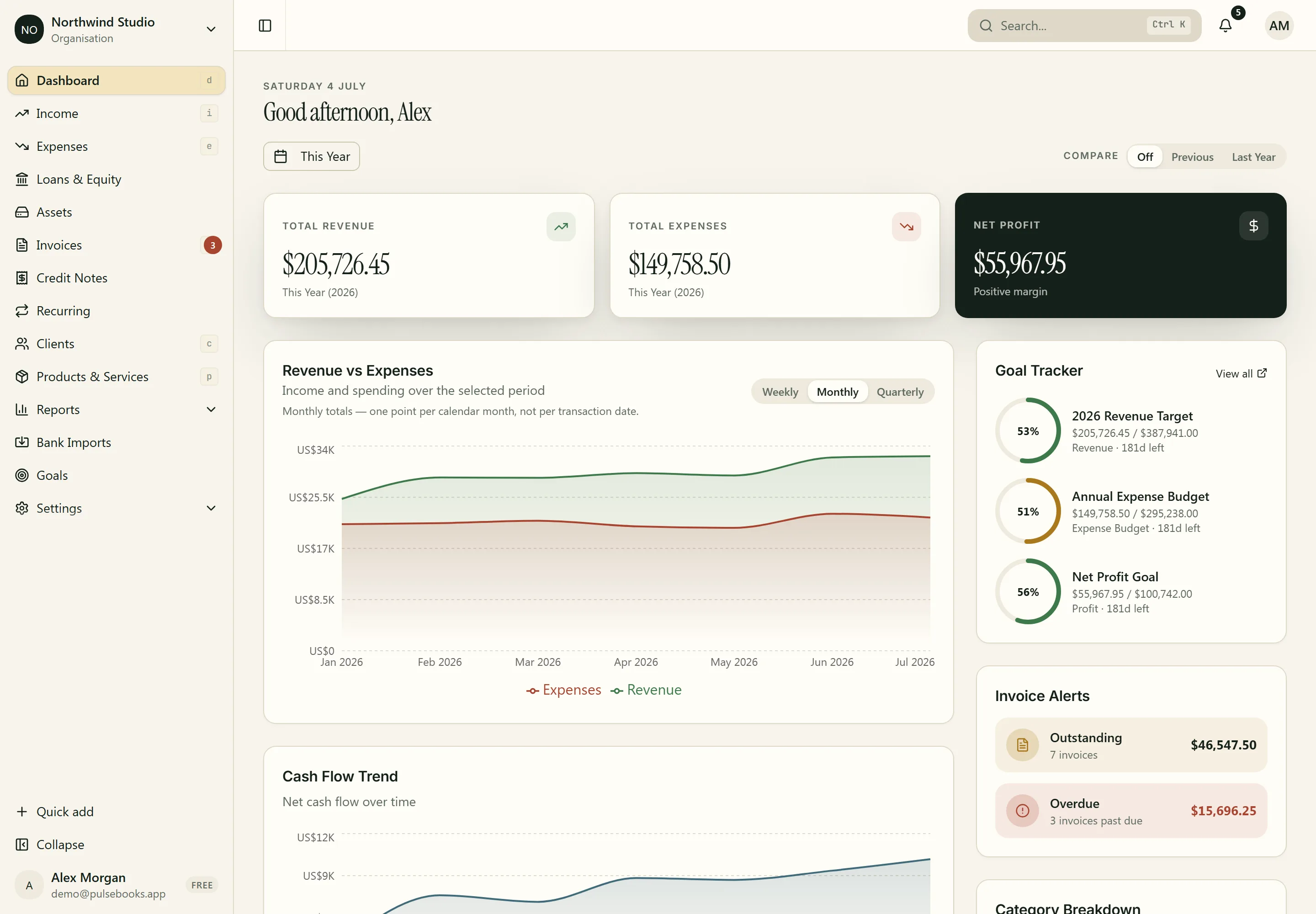
The dashboard is live. Cash position, open invoices, aging, goals against actuals, all current the moment you open it, whether the last entry came from you or from your assistant an hour ago.
It reads like a set of books, not a terminal. Warm paper, near-black ink, headlines with some weight behind them, and numbers set so the columns actually line up. Dark mode included, calibrated rather than inverted, for the late invoicing session.
You'll still open the app. The difference is that you'll open it to look, not to type.
$4,120.50
GETTING STARTED
No SDK, no API keys in a drawer somewhere. PulseBooks speaks MCP, the open standard your assistant already understands.
01
In Claude, ChatGPT, Cursor, or any MCP client, add PulseBooks as a connector. One address, found in Settings, then Developer.
https://pulsebooks.app/api/mcp
02
You'll land on a PulseBooks consent screen that spells out every permission the connection will hold. Nothing is granted until you approve, and you can revoke the connection at any time.
scopes: invoices · expenses · reports → Allow access
03
"What's overdue?" is a good first question. "Close out July" is a good tenth. So is handing it a photo of a receipt.
"What's overdue?"
Each assistant is its own connection with its own scopes, listed in Settings and revocable at any time.
PRICING
Flat monthly pricing. Agent access is part of the product, not an add-on tier.
$0
MCP included.
Real bookkeeping for a business that's just starting: income and expenses, invoicing with the client portal, reports, and agent access. Not a trial.
$19/mo
MCP included. Unlimited records and clients.
Everything in Free without the caps, plus the full back office: bank import and reconciliation, receipt OCR, fixed assets and depreciation, budgets, advanced reports, and up to five seats.
$39/mo
MCP included. Unlimited team, Peppol export.
Everything in Pro, plus unlimited team members with roles for your accountant and staff, and Peppol UBL invoice export for EU clients.
No credit card to start. Upgrade when the free plan stops being enough, not when a trial timer says so.
ONE LAST THING
You didn't start a business to type invoice numbers into a form. Somewhere along the way, evenings started disappearing into admin anyway.
PulseBooks gives that time back. The assistant you already talk to all day can now draft the agreement and invoice, file the receipt, and square the bank, in books you can open any time and hand to your accountant without apologising.
Start on the free plan. Connect your assistant, or don't, at first. Either way, the books get kept.
Free plan, no credit card. Set up in minutes, or ask your assistant to do it.The next receipt in your pocket could be the last one you type in by hand.